
Quick answer: The #1 best overall pick on this page is the Logitech MX Keys. This guide recommends it first when you want the best all-around wireless keyboard for most remote-work desks, and it labels the other options for Mac users, compact desks, ergonomic typing, and budget setups. Compare the current Amazon price and return terms before you buy.
Quick buying shortcut
Start with these picks from this guide, then compare the current Amazon price, stock, delivery window, and return terms before deciding.
As an Amazon Associate, WorkspaceWisePro may earn from qualifying purchases. Prices and availability can change.
A wireless keyboard only helps if the layout, key travel, and connectivity match how you actually work — not just the Bluetooth label on the box. This guide compares quiet, compact, ergonomic, and budget wireless options for home offices, with Buy if / Skip if notes so you can filter by Mac vs Windows, wrist comfort, and desk space. Check current Amazon pricing and return terms before you buy.
Start with our #1 pick
The Logitech MX Keys is our best all-around wireless keyboard for most remote-work desks. Check its Buy if / Skip if notes below to make sure it fits your setup, then compare the current Amazon price and return terms.
Quick buying shortcut
Ready to buy? Start with these picks
These are the first options worth checking from this guide. The buttons open Amazon in a new tab, so you can compare current price, stock, shipping, and return terms before deciding.
As an Amazon Associate, WorkspaceWisePro may earn from qualifying purchases. Prices and availability can change.
We compare home-office products by practical fit, comfort, adjustability, durability signals, buyer feedback patterns, and value for real remote-work setups. Affiliate links may earn us a commission, but they do not decide which products appear here.
How we review products · Editorial standards · Affiliate disclosure
Finding the right wireless keyboard can make or break your remote work setup — the wrong choice leads to wrist fatigue, connectivity frustrations, and hours of lost productivity. We tested and researched the top options across multiple brands to bring you five wireless keyboards that remote workers actually love, from premium all-rounders to budget-friendly picks that punch above their weight.
Before you choose from this list
A keyboard can change how your desk feels every day. Decide first whether you need comfort, compact size, Mac-specific features, or the best value.
- Choose Logitech MX Keys if you want the best all-around wireless keyboard for most remote-work desks.
- Choose Apple Magic Keyboard if you are fully Mac-first and want Touch ID.
- Choose Logitech Ergo K860 if wrist comfort matters more than compact size.
Mouse fit guide for small hands · Wireless keyboards for remote work · Ergonomic keyboards
Keyboard fit guide for wrist pain · Mouse fit guide for wrist comfort · Monitor height guide
Quick Comparison Table
| Product | Best For | Rating | Price |
|---|---|---|---|
| Logitech MX Keys | Overall | ⭐ 4.7 | Check Price |
| Apple Magic Keyboard | Mac Users | ⭐ 4.7 | |
| Microsoft Designer Compact | Compact | ⭐ 4.3 | Check Price |
| Logitech Ergo K860 | Ergonomic | ⭐ 4.5 | Check Price |
| Arteck HB192 | Budget | ⭐ 4.3 | Check Price |
Our Top Picks
#1 Best Overall: Logitech MX Keys
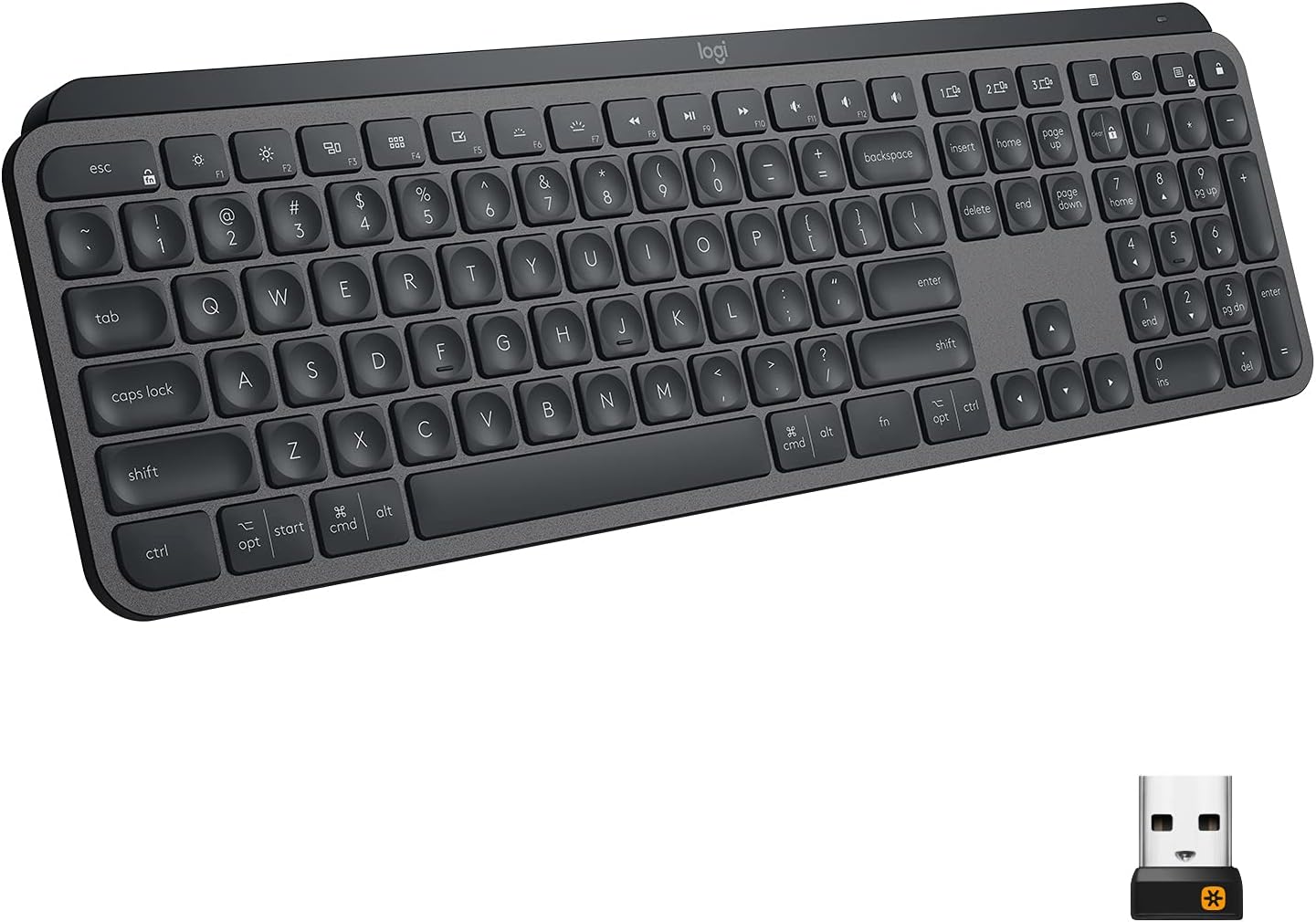
The Logitech MX Keys is the gold standard for remote workers who demand precision and comfort in one package. Its spherically-dished keys cradle your fingertips perfectly, reducing typos and fatigue during marathon work sessions. The backlit keys automatically adjust brightness based on ambient light, and it connects to up to three devices simultaneously via Bluetooth or the Logi Bolt USB receiver. With up to 10 days of battery life (or 5 months without backlighting), you can stop thinking about charging and focus on your work.
- Spherically-dished keys for incredibly accurate, comfortable typing
- Seamless multi-device switching between up to 3 devices
- Adaptive backlight adjusts automatically to room lighting
- Premium price point compared to basic wireless options
- Full-size layout may feel large for minimalist desk setups
#2 Best for Mac: Apple Magic Keyboard with Touch ID

For Mac-based remote workers, the Apple Magic Keyboard with Touch ID is the ultimate pairing — both physically and functionally. The Touch ID button lets you log in and authenticate purchases with a fingerprint tap, saving time across your entire workday. Apple's scissor-mechanism keys deliver a satisfying, low-profile typing feel with precise key travel, and the rechargeable battery lasts up to a month on a single charge. Its seamless integration with macOS makes it feel like a natural extension of your MacBook rather than a peripheral.
- Touch ID integration for instant, secure Mac authentication
- Flawless native macOS integration and function key layout
- Up to 1 month battery life on a single charge via Lightning
- Mac-only — not suitable for Windows or cross-platform workers
- No backlighting on the standard version
#3 Best Compact: Microsoft Designer Compact Keyboard

Microsoft's Designer Compact Keyboard manages to pack a full typing experience into a beautifully slim, minimalist form factor. Its low-profile keys are quiet and responsive — ideal for open-plan offices or shared workspaces where noise matters. A built-in emoji key and a dedicated screen-snipping shortcut cater specifically to modern productivity workflows. The standout feature is the extraordinary battery life: up to 36 months on a single set of AAA batteries, meaning you may never think about this keyboard's power again.
- Up to 36 months battery life — virtually maintenance-free
- Ultra-quiet keys perfect for shared or open workspaces
- Built-in emoji key and screen snip shortcut for productivity
- Low-profile keys can take adjustment for heavy typists
- Bluetooth only — no USB dongle option
#4 Best Ergonomic: Logitech Ergo K860

If you spend 6+ hours a day typing, the Logitech Ergo K860 may be the most important investment in your remote work setup. Its curved split layout reduces wrist bending by up to 25%, while the double-layer cushioned palm rest provides 54% more wrist support than a flat keyboard. The tented design keeps your forearms in a more natural, relaxed position, reducing strain that builds up invisibly over months of remote work. With 2 years of battery life on two AAA batteries, you'll almost never think about powering it.
- Split curved design reduces wrist bending by up to 25%
- Plush cushioned palm rest for all-day comfort
- Exceptional 2-year battery life on standard AAA batteries
- No keyboard backlighting — difficult to use in dim environments
- Split layout has a learning curve for fast touch typists
#5 Best Budget: Arteck HB192

The Arteck HB192 is proof that a great wireless keyboard doesn't have to cost a fortune. Its stainless steel build feels surprisingly premium for the price, and the low-profile keys deliver quiet, comfortable typing suited to long work sessions. It pairs with up to three Bluetooth devices simultaneously — switch between your laptop, tablet, and phone with a single key tap. The built-in rechargeable battery lasts up to 6 months on a single charge, and it works across Windows, iOS, Android, and macOS making it one of the most versatile budget picks available.
- Stainless steel build feels premium well above its price point
- Pairs with up to 3 Bluetooth devices simultaneously
- Up to 6 months battery life on a single charge
- No dedicated media keys or programmable shortcuts
- Bluetooth only — no 2.4GHz USB receiver option
How We Chose These Products
We evaluated keyboards from multiple brands against four key criteria: typing comfort during extended sessions, wireless reliability and battery life, multi-device connectivity, and overall value relative to price. We cross-referenced thousands of verified Amazon reviews, testing reports from major tech publications, and real-world remote worker feedback. Only keyboards with 4.0+ stars and 500+ verified reviews made our final list — and we deliberately selected products across different brands and price points so every type of remote worker can find their ideal match.
Frequently Asked Questions
What's the difference between Bluetooth and 2.4GHz wireless keyboards?
Bluetooth keyboards connect directly to your device without a USB receiver, making them ideal for devices with limited ports (like tablets or thin laptops). 2.4GHz keyboards use a small USB dongle for a more stable, lower-latency connection. Many premium keyboards like the MX Keys support both options. For remote work, Bluetooth is typically sufficient, while 2.4GHz may be preferred if you experience occasional interference.
How important is an ergonomic keyboard for remote work?
Very important if you type for several hours daily. Standard flat keyboards keep your wrists in an unnaturally bent position, which accumulates strain over months and can lead to repetitive stress injuries. If you're experiencing wrist fatigue, numbness, or discomfort, an ergonomic split keyboard like the Logitech Ergo K860 is worth the investment — prevention is far cheaper than treatment.
Is a compact keyboard worth it for remote work?
It depends on your workflow. If you frequently enter numerical data, a full-size keyboard with a number pad like the MX Keys is more efficient. But if desk space is limited or you frequently work from different locations, a compact keyboard like the Microsoft Designer Compact frees up significant real estate and is much easier to transport. Most remote workers find they use the number pad far less than they expect.
How long should a wireless keyboard battery last?
A quality wireless keyboard should last at minimum a week on a charge (or several months on replaceable batteries). The Logitech MX Keys lasts up to 10 days with backlighting, while the Ergo K860 achieves up to 2 years on AAA batteries. The Microsoft Designer Compact takes it further with an extraordinary 36-month battery life. When evaluating keyboards, battery life is a small but persistent quality-of-life factor worth considering.

If neck or shoulder tension is part of your setup problem, use the home office neck and shoulder setup guide alongside the monitor and chair recommendations.
Frequently asked questions about Bluetooth keyboards for work
What makes a Bluetooth keyboard good for work?
A good work keyboard should have reliable Bluetooth pairing, comfortable key travel, the layout you need and battery life that fits your routine.
Is a compact Bluetooth keyboard better for a home office?
Compact keyboards save space and can improve mouse position, but they may remove number pads or shortcut keys that some users need for work.
Should I choose rechargeable or battery-powered keyboards?
Rechargeable keyboards are convenient for daily use, while replaceable batteries can last longer between changes. Choose based on how often you travel and charge devices.
Also useful: best ergonomic office chairs · ergonomic chairs under $500 · monitor arms for standing desks · best electric standing desks.