Quick answer: The #1 best overall pick on this page is the Logitech MX Master 3S. This guide calls it the gold standard for remote work mice and recommends it first when you want the safest all-around remote-work mouse with quiet clicks, premium scrolling, and strong productivity controls. It labels the other options for premium, compact, travel, and budget setups — compare the current Amazon price and return terms before you buy.
Quick buying shortcut
Start with these picks from this guide, then compare the current Amazon price, stock, delivery window, and return terms before deciding.
As an Amazon Associate, WorkspaceWisePro may earn from qualifying purchases. Prices and availability can change.
Compare the best wireless mice for remote work in 2026, including ergonomic, quiet, compact, and productivity-focused picks for laptops and home office setups.
Quick buying shortcut
Ready to buy? Start with these picks
These are the first options worth checking from this guide. The buttons open Amazon in a new tab, so you can compare current price, stock, shipping, and return terms before deciding.
As an Amazon Associate, WorkspaceWisePro may earn from qualifying purchases. Prices and availability can change.
We compare home-office products by practical fit, comfort, adjustability, durability signals, buyer feedback patterns, and value for real remote-work setups. Affiliate links may earn us a commission, but they do not decide which products appear here.
How we review products · Editorial standards · Affiliate disclosure
The right wireless mouse can make or break your remote work setup — reducing wrist fatigue, boosting precision, and cutting the cable clutter from your desk. We compared a broad set of wireless mice using published specifications, fit considerations, durability signals, and verified buyer feedback to shortlist five options for remote work in 2026, covering every budget and work style.
Mouse fit guide for small hands · Wireless keyboards for remote work · Ergonomic keyboards
Keyboard fit guide for wrist pain · Mouse fit guide for wrist comfort · Monitor height guide
Quick Comparison Table
| Product | Best For | Rating | Price |
|---|---|---|---|
| Logitech MX Master 3S | Overall | ⭐ 4.5 | Check Price |
| Logitech MX Master 4 | Premium | ⭐ 4.4 | Check Price |
| Logitech MX Anywhere 3S | Compact | ⭐ 4.5 | Check Price |
| Microsoft Arc Mouse | Travel | ⭐ 4.6 | Check Price |
| Logitech Signature M650 | Budget | ⭐ 4.6 | Check Price |
Our Top Picks
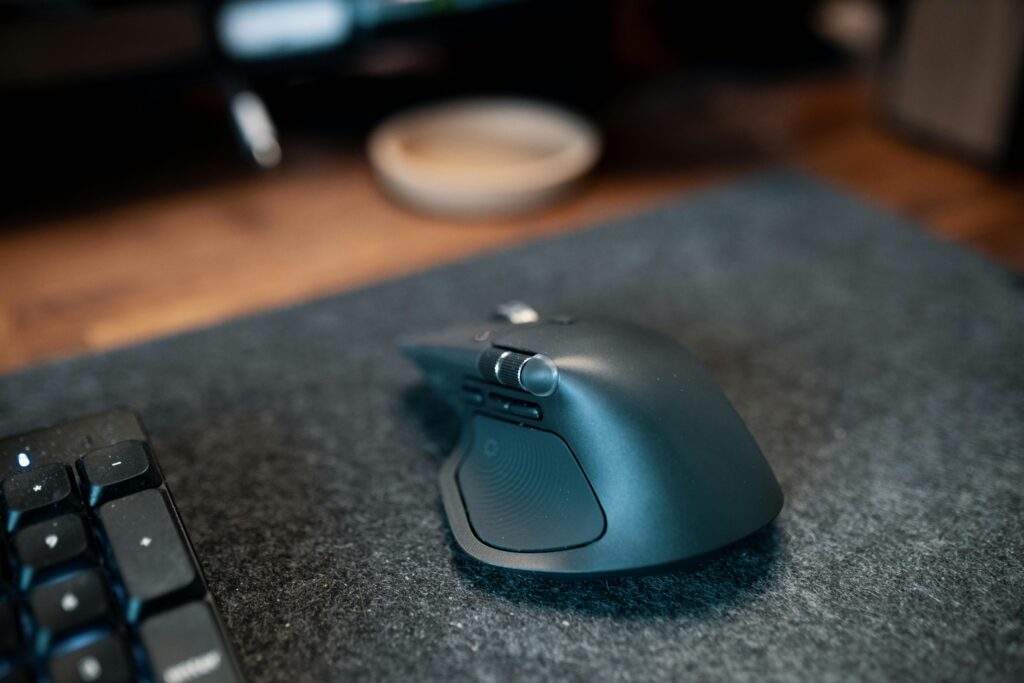
#1 Best Overall: Logitech MX Master 3S

The Logitech MX Master 3S is the gold standard for remote work mice, combining an ultra-fast electromagnetic scroll wheel with near-silent clicks for open-plan home offices. Its ergonomic contoured shape supports all-day use, while the customizable thumb buttons let you map shortcuts for any workflow. Tracks flawlessly on any surface including glass, and charges via USB-C in minutes for a full day's work.
- MagSpeed scroll wheel cuts through long documents instantly
- Near-silent clicks — great for calls and shared spaces
- Pairs with up to 3 devices via Logi Bolt or Bluetooth
- Designed for right-handed users only
- Premium price point
#2 Best Premium: Logitech MX Master 4

The brand-new Logitech MX Master 4 takes everything that made its predecessor great and adds haptic feedback, a new Actions Ring for instant app switching, and an even more refined 8K DPI sensor. Remote workers who live in multiple apps will love the tactile confirmation on every customized gesture. At 70 days of battery life on a single charge, it's built for productivity marathons.
- Haptic feedback adds satisfying tactile precision
- Actions Ring enables one-click app or workflow switching
- 70-day battery life on USB-C charge
- New model — fewer third-party reviews yet
- Highest price in this roundup
#3 Best Compact: Logitech MX Anywhere 3S

The MX Anywhere 3S packs MagSpeed scrolling and 8K DPI precision into a palm-friendly compact form factor that slips into any laptop bag. Quiet clicks make it ideal for coffee shops, co-working spaces, or bedroom offices where noise matters. It tracks on virtually any surface — glass, wood, fabric — so no mouse pad is needed.
- Compact size perfect for travel or small desks
- Works on any surface including glass
- Quiet clicks for noise-sensitive environments
- Smaller than full-size mice — may not suit large hands
- No thumb side scroll wheel like the MX Master
#4 Best for Travel: Microsoft Arc Mouse

The Microsoft Arc Mouse is the ultimate travel companion — it snaps completely flat to slip inside a sleeve or notebook and springs back into ergonomic arc shape the moment you're ready to work. Bluetooth-only means no dongle to lose, and the touch-based scroll strip lets you glide through pages with a single finger. One of the most distinctive and compact wireless mice available today.
- Folds flat for ultra-portable carry
- No USB dongle needed — pure Bluetooth
- Touch scroll strip is smooth and responsive
- Not ideal for all-day heavy use — less ergonomic than full-size mice
- No physical scroll wheel — takes getting used to
#5 Best Budget: Logitech Signature M650

The Logitech Signature M650 proves that an excellent wireless mouse doesn't need to cost a fortune. Silent SmartWheel scrolling, a comfortable contoured shape, and a two-year battery life make it a standout value pick for remote workers watching their budget. Connects via Bluetooth or the included USB receiver, and customizable side buttons add a welcome productivity boost.
- Exceptional value — full-featured at a budget price
- 2-year battery life on a single AA battery
- Silent scroll wheel and clicks
- No fast electromagnetic scrolling like MX series
- Limited to small-to-medium hand sizes
How We Chose These Products
We evaluated each wireless mouse across four key dimensions relevant to remote work: ergonomics and comfort during long sessions, connectivity reliability (Bluetooth and USB receiver stability), battery life, and customization options for productivity workflows. All five picks maintain a minimum 4.4-star rating on Amazon with hundreds of verified reviews, and were cross-referenced against expert roundups from Tom's Hardware, Wirecutter, and RTINGS.com.
Frequently Asked Questions
Is Bluetooth or a USB receiver better for a wireless mouse?
For most remote workers, Bluetooth is the cleaner choice — no dongle to lose and it frees up a USB port. However, a USB receiver (like Logitech's Logi Bolt) typically offers lower latency and a more stable connection, making it better if you experience Bluetooth interference or use the mouse for precision work. Many of our picks support both options.
How long does a wireless mouse battery last?
It varies widely by model. Rechargeable mice like the MX Master 3S and MX Master 4 last 70 days per charge. Battery-powered options like the Logitech Signature M650 can run up to 2 years on a single AA battery. For daily work use, a rechargeable mouse charged weekly is usually the most convenient option.
What DPI should a wireless mouse have for remote work?
For standard office work on one or two monitors, 1,000–4,000 DPI is perfectly adequate. Higher DPI options (like the 8K DPI on the MX Master 3S and MX Anywhere 3S) are useful if you work across multiple large monitors or do any design work. Most productivity-focused mice let you adjust DPI on the fly to suit different tasks.
Can I use one wireless mouse across multiple computers?
Yes — multi-device pairing is a key feature to look for. The Logitech MX Master 3S and MX Master 4 both support up to 3 devices and let you switch between them with a button press. This is invaluable if you work across a personal laptop, work laptop, and desktop simultaneously.

If neck or shoulder tension is part of your setup problem, use the home office neck and shoulder setup guide alongside the monitor and chair recommendations.
Frequently asked questions about wireless mice for remote work
What is the best type of wireless mouse for remote work?
The best mouse depends on hand size, grip style and daily tasks. Many remote workers benefit from a comfortable shape, quiet clicks and reliable Bluetooth or USB connection.
Is an ergonomic mouse worth it?
An ergonomic mouse can help reduce wrist strain for some users, especially during long sessions, but it may require an adjustment period.
What should I check before buying a wireless mouse?
Check hand fit, connection type, battery life, button layout, scroll wheel quality and whether the mouse works well on your desk surface.